PDF or Editable Document: Choosing a File for Sharing
PDF or editable document? Choose the right file for sharing by matching its appearance, revision needs and recipient’s software to the job.
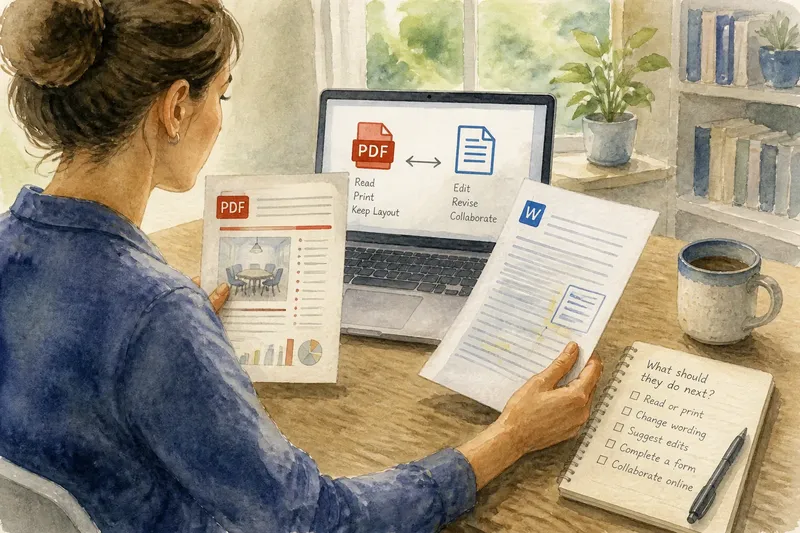
You have finished a meeting handout and are about to send it to a colleague. The page looks tidy on your screen, but they may need to change a date, add a note or print copies. Choosing a PDF or editable document starts with that small uncertainty: should the recipient see the content as it stands, or work on it?
Should I send a PDF or an editable document?
Send a PDF when the recipient mainly needs to read, print or keep a document whose layout should stay consistent. Send an editable document when they need to revise its wording, structure or data. The choice is about the recipient’s next action, not which format is universally better.
A PDF preserves a page-oriented view: text, images and spacing are arranged to look much the same across compatible viewers. An editable file, such as a Microsoft Word document or a Google Docs file, is designed for changes. Its appearance can shift with fonts, software, page settings or the recipient’s edits.
Think of a PDF as a printed notice behind clear glass: easy to inspect, awkward to rewrite. An editable document is closer to a marked-up draft on a desk. That freedom helps collaboration, but it also means the file can change.
Will a PDF look the same on another device?
A PDF is usually the better choice when page arrangement matters. A flyer, signed form, agenda or carefully formatted report can retain its page breaks and visual hierarchy when opened on a different device. It can also be convenient for printing because the recipient is less likely to see a reflowed layout.
“Usually” matters: PDF viewers, fonts, accessibility features and printer settings differ. A page may still display or print differently in some circumstances. If a document must meet a particular submission or print requirement, check the receiving organisation’s instructions before sending it.
A PDF is not automatically a picture. Many PDFs contain selectable text, which can be searched or copied, and some include form fields or comments. But text selection does not make a document as straightforward to revise as its original word-processing file. Scanned pages may be images instead, which can make searching or copying difficult.
Can the recipient edit a PDF?
Sometimes, but the recipient may need suitable software, and changes can be less convenient than editing the source document. A PDF editor can add comments, fill fields or alter some text; the available options depend on how the PDF was made and what tools the recipient has. A scan can require text recognition before its words are editable at all.
If the recipient needs to suggest changes, a document with comments or tracked changes is often a clearer hand-off. It lets people distinguish proposed edits from the original wording. If they only need to complete a fixed form, a fillable PDF may be more suitable than a fully editable file.
Which file should I send for review or revision?
Send an editable document when you expect substantive revisions, shared drafting or reuse of the content. A Word file may suit someone working in Microsoft Word; a Google Docs link can suit collaborators who need to work in a shared online document. Check that the recipient can access the service and has the intended permissions before relying on a link.
Say you are sending a draft room-booking policy, and your colleague needs to change the contact name and propose new wording. Sending the Word file gives them room to revise and comment; the observable result should be a returned document containing their changes rather than a separate list of requested edits. Once wording is approved, you could export a PDF for people who only need to read or print the policy.
For a one-way review, comments can be enough without handing over the main text for unrestricted editing. For a reusable template, an editable file is useful, but name it clearly as a working copy so nobody mistakes it for an approved version.
What should I consider before sharing a document?
Consider the recipient’s task, the importance of layout, the kind of edits expected and the software they can use. The practical choice may be to send both formats, with a short note explaining which one is authoritative and what action you want. That avoids leaving the recipient to guess whether a PDF is for reference or the editable file is the final version.
- Reading or printing: choose PDF if a stable page layout matters.
- Changing the wording: choose an editable document.
- Suggesting revisions: use comments or tracked changes where available.
- Completing a fixed form: consider a fillable PDF.
- Collaborating online: use a shared document only if the recipient can access it.
- Keeping an approved copy: label the final version clearly and avoid confusing it with a draft.
Also check the filename and the document itself. A name such as “Policy-final” may become confusing after several rounds; a plain title with a clear draft or approved label is easier to interpret. Remove comments or personal details that the recipient does not need, and consider whether the file contains material you should not share. For confidential or regulated information, follow your organisation’s rules and seek appropriate guidance.
How do PDFs and editable documents differ?
Can I convert a Word document to PDF?
Yes. Word and other word processors commonly offer an export or save-as option for PDF. The exported file is useful for sharing a settled layout, while keeping the original editable document gives you a source for later revisions.
Can someone edit a Word file without Word?
Possibly: other word processors may open and edit Word files, though fonts, spacing or features can differ. If exact appearance matters, share a PDF as well or ask the recipient which format their software handles reliably.
Is a PDF safer from unwanted changes?
A PDF can make casual editing less convenient, but its format alone does not prevent copying, editing or sharing. For sensitive material, use appropriate access controls and follow the relevant organisation’s handling rules rather than treating a file extension as protection.
What if I need both a fixed copy and future edits?
Keep the editable source for future changes and export a PDF when you need to distribute an approved version. Give the files distinct names and state which one recipients should read or revise.
For a quick decision about a PDF or editable document, ask one question: what should the recipient be able to do next? If the answer is “see this as arranged”, send the PDF; if it is “change or build on this”, send the editable file. When both actions matter, sharing a clearly labelled pair preserves the reading copy without closing the door on useful revisions.